Minecraft Pentagon Generator — 5-Sided Block Layouts | MC Circle
Free Minecraft pentagon generator: enter a diameter for regular five-sided block layouts—outline, thickness, or filled. Build pentagon plazas, keeps, and pixel emblems.
Total blocks: 55
How To Use
Pick a bounding diameter
Shape is preselected to Pentagon. Diameter is the bounding width (point-up)—odd sizes keep a clearer vertical center through the top vertex.
Mark corners, then connect sides
Place temporary corner posts from the canvas extremes, then fill each edge following the preview rows. Corners are the stress points.
Outline, thickness, or filled
Thickness 1 hollow for hedges and frames; raise Thickness for curtain walls; enable Filled for plazas and roof pads.
Pentagon placement reference
Row highlighting and exports work the same as on the circle homepage. The short demo reuses the homepage placement video as a stand-in until a pentagon-specific clip is recorded.
Pentagon outline grid
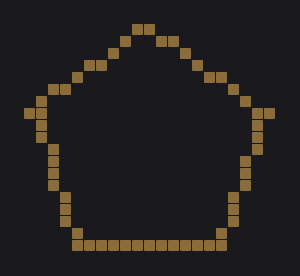
A pixel-style five-sided outline from the shared generator—good for star-fort walls, guild emblems, and map-art frames.
Filled pentagon pad
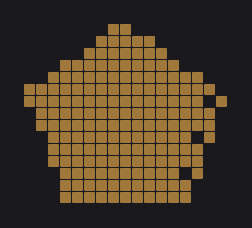
Solid pentagon floors for plazas, farms, and keep roofs. Stack the same diameter upward for a prism tower.
What a Minecraft pentagon layout is
A regular pentagon has five equal sides and equal interior angles. On Minecraft’s block grid the sides become stair-stepped runs—just like a circle—but with five flat-ish faces and five corners instead of a continuous curve. Builders search for a Minecraft pentagon when they want star-fort vibes, pentagon plazas, guild emblems, or a keep that is not another round tower.
Diameter here is the bounding width of the pentagon (point-up), matching how the circle tool talks about size so you can compare footprints. Odd diameters keep a clearer vertical center line through the top vertex—handy for banners and beacons.
Outline, thickness, and filled pentagons
Hollow outlines suit hedges, wall footprints, and map-art frames. Thickness grows the wall inward so a pentagon keep can have two-block-thick curtains without a solid fill. Filled mode creates plazas, farms, and roof pads. Stack the same diameter upward for a prism tower, or shrink diameter every few levels for a tapered pentagon spire—the same stacking idea as dome and tower circles, just with five sides.
Build ideas
- Pentagon town plaza with a fountain on the center cell of a filled layout.
- Star-fort style outer wall: thickness 2–3 outline around an inner courtyard.
- Guild banner mosaic: outline pentagon on a wall using contrast wool.
- Nested pentagons (generate twice at different diameters) for walkways.
- Roof: filled pentagon slabs matching the keep’s footprint.
Pentagon vs circle vs ellipse
Circles maximize “roundness” for towers and arenas—start at the Minecraft circle generator. Ellipses stretch that idea for racetracks— ellipse generator. Hearts cover Valentine silhouettes— heart generator. Pentagons trade curves for five readable faces and sharper corners when your build brief wants geometry over smoothness.
Placement habits transfer: row recipes, quadrant (here: half) mirroring, and axis labels still apply. See how to build a Minecraft circle for the general workflow, then swap Shape to Pentagon (client navigation keeps your diameter and toggles).
FAQ
Is pentagon support new?
Yes—Pentagon is now a first-class shape in the shared MC Circle builder (previously only mentioned on the roadmap). This page is its keyword landing with the tool embedded.
Point-up or flat-top?
Layouts are generated point-up (one vertex toward −Z / “north” on the preview). Rotate in-world if you need a flat-top orientation.
Do thickness and filled work here?
Yes—every shape in the picker, including Pentagon, supports wall thickness and an explicit filled toggle (default outline / thickness 1).